Wiki Extensions en » 履歴 » リビジョン 48
« 前 |
リビジョン 48/55
(差分)
| 次 »
Tomohisa Kusukawa, 2011/06/09 08:34
Redmine Wiki Extensions Plugin
- 目次
- Redmine Wiki Extensions Plugin
- Downloads
- Footnote
- Adding comment form
- Link to the page of other projects.
- Link to other projects
- New macro
- Tags
- Editing Style Sheet
- Footer
- Recently added pages
- Displays the person who updated the page.
- Displays the time when the page was updated.
- Add tabs to project menu.
- Displays the page of other site.
- Access counter
- Auto preview
- Sortable table
- twitter macro
- List issues
- Emoticons
日本語は こちら.
This plugin adds usefull wiki macros into your Redmine.
Downloads
Installation
- Copy the plugin into the vendor/plugins directory
- Migrate plugin: rake db:migrate_plugins RAILS_ENV=production
- Start Redmine
- Enable the module on the project setting page.
Footnote
This macro creates footnotes*1 in wiki pages.
Syntacs
{{fn(word, description)}}:
ex.
This site is {{fn(Redmine, One of the best project management tool.)}} site.
"This site is Redmine*2 site."
You can see footnotes on the bottom of this page.
Adding comment form
You can add a comment form in a page.
Syntacs
{{comment_form}} displays the comment form in a page. And {{comments}} macro displays the list of comment.
Haru Iida さんがほぼ15年前に追加
This is a sample of comment.
sundisb billaaa さんが約11年前に追加
[b][url=http://www.outletchanelshop.com/]chanel bags outlet online[/url][/b]
[b][url=http://www.outletchanelshop.com/]chanel <strong><a href="http://www.outletchanelshop.com/">chanel bags outlet online</a></strong>
<br>
<strong><a href="http://www.outletchanelshop.com/">chanel bags for sale</a></strong>
<br>
<strong><a href="http://www.outletchanelshop.com/">chanel handbags for sale</a></strong>
<br>
<strong><a href="http://www.outletchanelshop.com/">discount chanel handbags</a></strong>
<br>
<strong><a href="http://www.outletchanelshop.com/">chanel handbags 2012</a></strong>
<br>
Of course you can use Wiki format
Link to the page of other projects.
[2009/06/11]
You can create the link to the page of other projects.
Syntacs
{{wiki(project_name, wiki_page)}}{{wiki(project_name, wiki_page, alias)}}{{wiki(project_identifier, wiki_page)}}{{wiki(project_identifier, wiki_page, alias)}}
Link to other projects
[2009/06/11]
You can create the link to projects.
Syntacs
{{project(project_name)}}{{project(project_name, alias)}}{{project(project_identifier)}}{{project(project_identifier, alias)}}
ex.)
The project of Wiki Extensions Plugin is {{project(Wiki Extensions, here)}}.
"The project of Wiki Extensions Plugin is here."
New macro
[2009/06/12]
Syntacs
- {{
new(yyyy-mm-dd)}} - {{
new(yyyy-mm-dd, expire)}}
Displays the string "new" if specific date does not expired. Default of expire is 5 days.
Tags
[2009/06/23]
You can see the tag input form at the bottom of the wiki editing page. You can add several tags to each wiki pages.
And {{tagcloud}} macro displays the tag cloud. so you can write this macro into SideBar like this site.
{{taggedpages(tagname)}} macro displays the list of pages which have specified tag.[2010/10/05]
{{taggedpages(tagname1[,tagname2..,tagnamen], project)}} macro displays the list of pages of project which have specified tags.[2010/12/06]
Editing Style Sheet
[2009/07/16]
You can write CSS in the page named StyleSheet. This CSS is included in a HTML header of each page. Each page means every module of the project. not only wiki.
So. you can even create a project-specific theme.
And if you want to change a style of a part of the page, you can use following macros.
- {{
div_start_tag(id_name)}} is changed to、< div id="id_name">. - {{
div_start_tag(id_name, class_name)}} is changed to< div id="id_name" class="class_name">. - {{
div_end_tag}} is changed to < /div>.
ex.
{{div_start_tag(sample_tag)}}
Style of this line was changed.
{{div_end_tag}}
Style of this line was changed.
Footer
[2009/08/04]
If you create the page named "Footer", you can see it at the bottom of the every pages.
For example. If you want to add the comment form to every pages, you should write like below.
{{comments}}
{{comment_form}}
Recently added pages
[2009/08/04]
{{recent}} macro displays the list of the pages that were changed within last 5 days. If you specify the argument like {{recent(10)}}, it displays the pages that were changed within 10 days.
Displays the person who updated the page.
[2009/09/06]
{{lastupdated_by}} macro displays the name of user who updated the wiki page.
Displays the time when the page was updated.
[2009/09/06]
{{lastupdated_at}} macrodisplays the timestamp when the wiki page was updated.
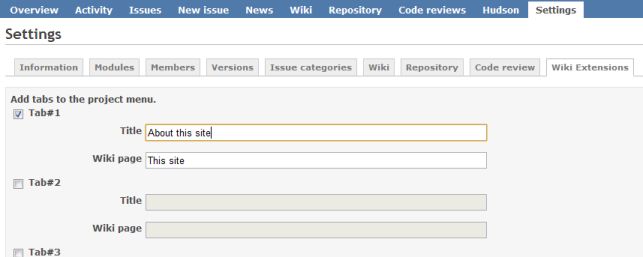
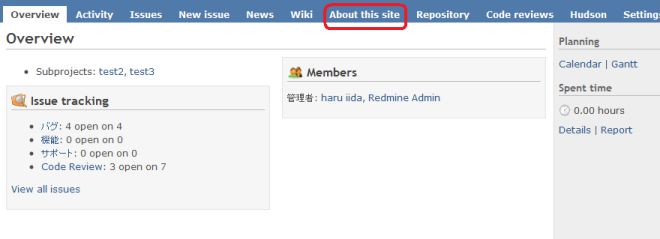
Add tabs to project menu.
[2009/09/06]
You can add project menu tabs that links to wiki page.
Displays the page of other site.
[2009/10/08]
iframe macro displays the page of other site into the wiki page.
Syntacs
{{iframe(url)}}
{{iframe(url, width, height)}} or
{{iframe(url, width, height, scrolling)}}
scrolling is a value of scrolling option of iframe.[yes, no, auto]
example
Displaying wikipedia.
{{iframe(http://en.wikipedia.org/wiki/Redmine, 700, 400)}}
Access counter
[2009/10/31]
{{count}} macro counts acesses to the wiki pages. You can write this macro into the wiki page that you want to count accesses. If you want to count accesses to all of the pages, you can write {{count}} to the Footer page.
{{show_count}} macro displays the count of the page.
{{popularity}} macro displays the list of the access counts. If you specify the number in the argument, ex. {{popularity(10)}}, displays the top 10 access list.
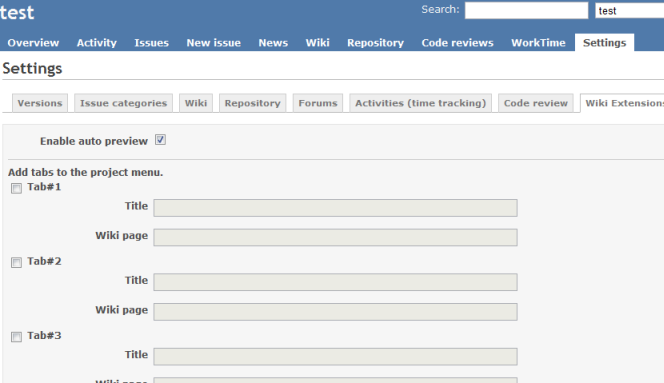
Auto preview
[2010/02/02]
If you enabled this function, preview of wiki, forum and issue is displayed automatically. You can enable it on project setting page.
Sortable table
[2010/10/05]
You can sort table items by clicking header.
ex)
|_.fruits|_.color|
|Apple|Red|
|Banana|Yellow|
|Mellon|Green|
| fruits | color |
|---|---|
| Apple | Red |
| Banana | Yellow |
| Mellon | Green |
twitter macro
[2010/10/05]
{{twitter(username)}} macro links to tiwtter page.
ex.) {{twitter(haru_iida)}} -> @haru_iida
vote macro
[2010/12/06]
{{vote(key)}} macro displays a link for vote. You must specify a "key" which is unique in the page.
ex.)
APPLE {{vote(apple)}}
LEMON {{vote(lemon)}}
BANANA {{vote(banana)}}
to
APPLE 投票 14
LEMON 投票 14
BANANA 投票 14
{{vote(key,label)}} displays label insteadof string "vote".
ex.)
{{vote(apple2, I like apples.)}}
{{vote(lemon2, I like lemons.)}}
{{vote(banana2, I like bananas.)}}
to
List issues
[2011/01/19]
ref_issues macro displays list of issues.
You can use custom query or keyword for selecting issues.
Syntacs
{{ref_issues([options]..., [column]...)}}
options:
- -q=[CustomQuery name]: Name of custom query.
If you specify this option, -SD is used for default arugment. if not, -sd is used for default argument. w=[search word]: Specify the word you want to search.The problem occurs in the latest version. It is investigating.
If you do not specify the word, page name is used for search.- -s : The subjects are retrieved.
- -S : The subjects are not retrieved.
- -d : The descriptions are retrieved.
- -D : The descriptions are not retrieved.
- -p : Only the issues in the same project is displayed.
columns:
You can choose columns that you want to display.
If you do not specify the columns, same columns with customquery are displayed.
- project
- tracker
- parent
- status
- priority
- subject
- author
- assigned_to
- updated_on
- category
- fixed_version
- start_date
- due_date
- estimated_hours
- done_ratio
- created
example
{{ref_issues(-q=プロジェクト毎,-sdw=commit)}}
Emoticons
[2011/01/02]
You can add emoticons to wiki page.
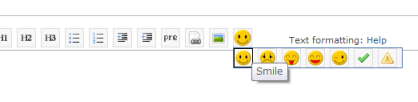
You can also use your original emoticons.
- Edit redmine_wiki_extensions/config/emocitons.yml
- Put your emoticon image into redmine_wiki_extensions/assets/images.
- Restart redmine.
Updated by 
Access count: 945844 :since 2009-10-30
Tomohisa Kusukawa さんがほぼ13年前に更新 · 48件の履歴